

PropOps iOS
Dashboard

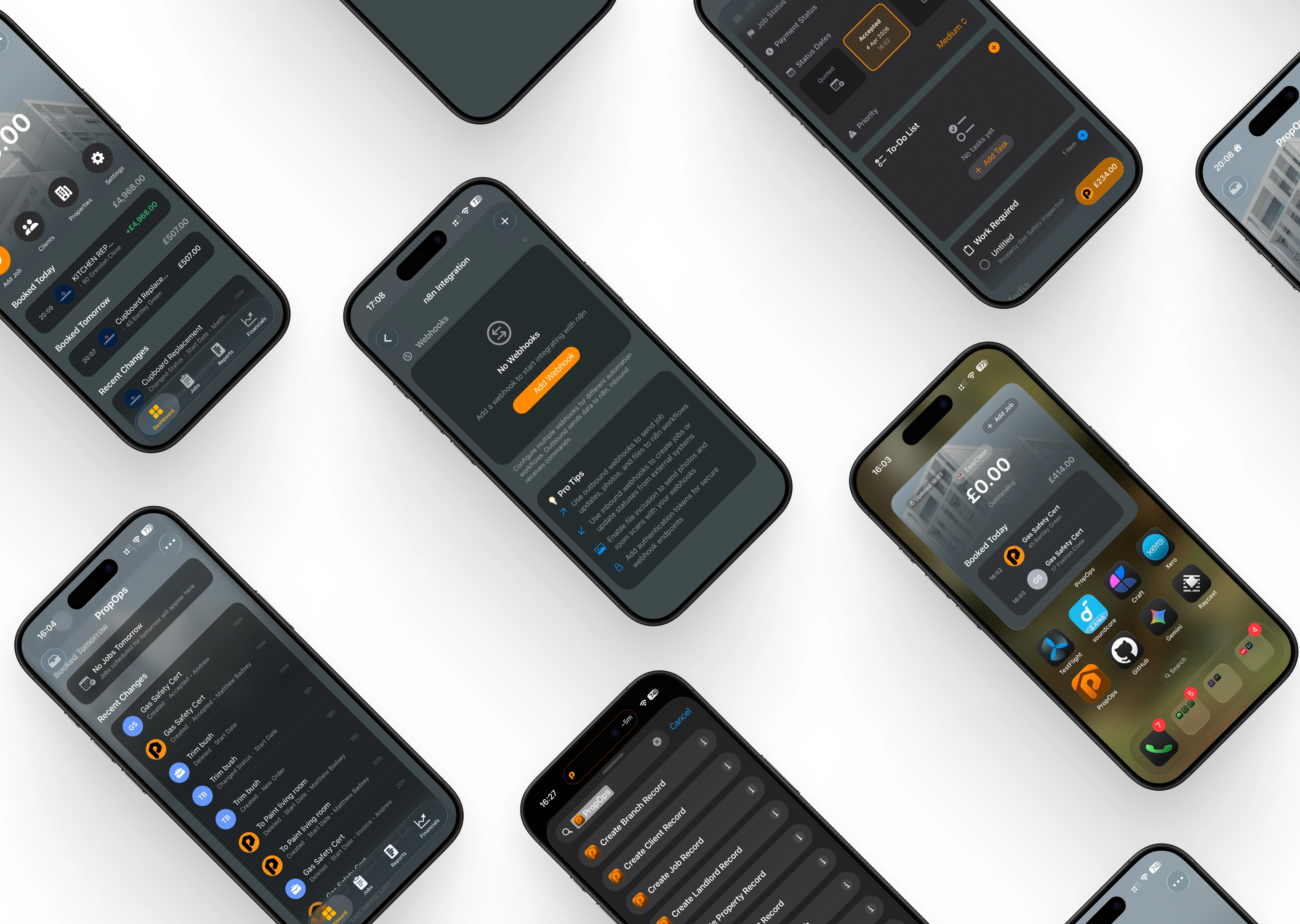
The PropOps iOS App is the ultimate companion for the solo contractor. Engineered to strip away administrative friction, it acts as your personal digital office, allowing you to manage your entire workload, track your earnings, and maintain professional records without ever opening a laptop.
Financial Clarity at a Glance
Stop wondering where your money is. The mobile dashboard provides an instant, high-visibility summary of your current financial standing:
-
Outstanding Ledger: See exactly what you’re owed the second you unlock your phone.
-
Daily Earnings Tracker: View the total value of jobs booked for “Today” and “Tomorrow,” helping you stay motivated and on top of your targets.
Built for the Field
We know you’re often working with one hand free. The interface is designed for rapid navigation and “on-the-tool” updates:
-
One-Tap Job Entry: Log new instructions or call-outs instantly with the prominent “Add Job” button.
-
Property & Client Database: Carry your entire history of addresses and contacts with you. Access specific job details, such as “Kitchen Repairs” or “Cupboard Replacements,” along with precise site locations in two taps.
-
Simplified Workflow: A clean, vertical timeline shows you exactly where you need to be next, reducing the “mental load” of scheduling.
Professionalism by Default
PropOps iOS gives the solo operator the digital infrastructure of a large firm.
-
Native iOS Performance: Enjoy a fluid, responsive experience optimized for your iPhone.
-
Live Activity Feed: Keep a forensic record of “Recent Changes,” giving you a clear audit trail of completed work and scheduled appointments for better accountability and easier invoicing.
Recent Changes

As a solo contractor, keeping track of every administrative tweak while on-site can be a challenge. The Recent Changes feed acts as your automated logbook, capturing every movement within your business in real-time. This isn’t just a list—it’s a forensic audit trail of your productivity.
Complete Operational History
Never lose track of a status change or a deleted entry again. The feed provides a high-fidelity record of:
-
Status Updates: Instantly see when a job moves from “New Order” to “Accepted.”
-
Creation & Deletion: Maintain a clear history of when certificates (like Gas Safety Certs) were generated or when scheduled tasks were modified.
-
Timestamped Precision: Every action is tagged with its exact timing—from “now” back through the hours and days—giving you a reliable timeline to reference during billing or client disputes.
Accountability and Clarity
Even when working solo, the system tracks the “who” and “when” of every change:
-
Visual Categorisation: Clean iconography helps you distinguish between different job types (e.g., painting, gardening, or safety certifications) at a glance.
-
Smart “No Jobs” Alerts: The dashboard intelligently warns you when your schedule is clear (e.g., “No Jobs Tomorrow”), allowing you to proactively fill your diary and maximize your earning potential.
Job Templates

For the solo contractor, time spent typing is time spent away from the tools. PropOps iOS features a powerful Job Templates engine, allowing you to pre-configure your most frequent services for instant deployment. Whether it’s a standard “Gas Safety Certificate” or a recurring maintenance task, you can launch a full job order in seconds.
Standardise Your Workflow
Templates allow you to build a library of your standard services, ensuring consistency and professional accuracy every time:
-
Custom Template Profiles: Set unique Template Names (e.g., “GSC – PropOps”) to easily distinguish between different service packages.
-
Pre-Set Job Parameters: Define the Job Title, Job Type, and initial Job Status (such as “Accepted”) in advance. When you create a job from a template, these fields auto-populate, removing the need for manual data entry on-site.
Integrated Service Cataloguing
Take the guesswork out of pricing and service descriptions by building detailed line items directly into your templates:
-
Itemised Services: Attach specific Service Prices and Items to your templates.
-
Rich Item Descriptions: Pre-write technical descriptions or service scopes. This ensures that every invoice or job sheet is forensically detailed without you having to type a single word during the busy workday.
-
Scalable “Plus” Logic: Quickly add new templates using the intuitive “+” trigger, allowing your service library to grow alongside your business capabilities.
Settings
The PropOps Settings suite provides solo contractors with a deep level of customisation usually reserved for enterprise systems. This is your command centre—a unified space to define your brand, automate your finances, and bridge the gap between field work and office administration.
Financial & Business Identity
-
Business Details & Management: Centralise your professional identity. Manage client databases, property portfolios, and branch details to keep your “single source of truth” organized.
-
Financial Logic: Automate your overheads by setting global Currency (GBP) and Tax/VAT rates. Once configured, the system handles the calculations across all jobs and templates automatically.
-
Service Price Engine: Maintain a master list of your service prices and document templates, ensuring you never undercharge or provide inconsistent quotes.
Intelligent Job Configuration
Tailor the app to match the unique rhythm of your workday:
-
Nearby Job Live Activity: Harness native iOS power with Live Activity tracking, providing real-time proximity alerts and job status updates directly on your lock screen.
-
Custom Status & Date Fields: Beyond standard “Accepted” or “Completed” statuses, you can define your own Job Types, Payment Statuses, and Status Date Fields to map perfectly to your specific trade.
-
Job Notifications: Set custom alert windows (e.g., 60-minute reminders) so you’re always prepared for the next site visit.
Advanced Integration & Personalisation
PropOps iOS scales with your technical needs through a suite of modern “Power-User” features:
-
Work Caller ID: Identify clients the moment they call by syncing your PropOps database with your device’s native phone app.
-
Photo Watermarks: Protect your work and build brand authority by automatically applying watermarks to site photos.
-
n8n Webhooks: For the automation-first contractor, connect PropOps to thousands of external apps via webhooks to sync data with your accounting software or CRM.
-
Interface Customisation: Personalise your workspace by adjusting the Dashboard layout and Background aesthetics to suit your style.
Widgets

PropOps brings your business critical data out of the app and directly onto your home screen. Our native iOS widgets are designed for the solo contractor who needs to stay informed without even unlocking their device. By providing a real-time window into your daily operations, you can maintain total situational awareness while on the move.
Zero-Click Financial Awareness
The PropOps widget provides a high-contrast summary of your most important metrics:
-
Persistent Financial Tracking: Keep your “Outstanding” balance front and center, ensuring you never lose sight of your cash flow.
-
Daily Earnings Snapshots: View your “Booked Today” total at a glance, giving you instant feedback on your daily performance.
Streamlined Operational Access
Designed for rapid response, the widget acts as a shortcut to your most frequent tasks:
-
Instant Action Trigger: Use the integrated “+ Add Job” button to launch the job creation engine directly from your home screen, saving valuable seconds between site visits.
-
Live Job Feed: The widget automatically populates with your current schedule—such as “Gas Safety Certs” at specific locations like “Bartley Green” or “Foxtron Close”—complete with timestamps and icons for immediate recognition.
-
Real-Time Sync: With a “Last Updated” timestamp, you can trust that the data you’re seeing is accurate and reflects the very latest changes in your business.
Apple Shortcuts

PropOps iOS deeply integrates with the Apple ecosystem, exposing core business functions to the Shortcuts app. This allows solo contractors to move beyond manual data entry and build custom, automated workflows that trigger via Siri, Home Screen icons, or automated schedules.
Hands-Free Command
When you’re on-site or driving between jobs, you don’t always have time to navigate an app. With PropOps Shortcuts, your business becomes voice-activated:
-
Siri Integration: Create custom voice commands to “Create a Job Record” or “Open New Client” without ever touching your screen.
-
Instant Record Creation: Trigger background actions to instantly create Branch, Client, Landlord, Property, or Tenant records.
-
Deep Linking: Use shortcuts to “Open Add New Job” or “Open Dashboard Tab” to bypass standard navigation and jump exactly where you need to be.
Bespoke Business Logic
Shortcuts allow you to connect PropOps to other native iOS features for a truly integrated experience:
-
Automated Record Keeping: Create a shortcut that creates a PropOps Job Record and simultaneously adds a calendar event or a reminder in your iPhone’s native apps.
-
Streamlined Onboarding: Use the “Create Tenant Record” or “Create Landlord Record” actions to build out your database on the fly, ensuring your CRM is updated the moment you meet a new contact.
-
One-Tap Workflows: Place specific shortcut buttons on your home screen for your most frequent tasks, effectively creating your own custom “mini-app” interface tailored to your specific trade.